เวิร์กช็อป: ปั้นเว็บข้อสอบ HSK ระบบ 3 ทักษะด้วย AI
มาสร้างเว็บจำลองการสอบ HSK แบบ Full Option!
จัดเต็มทั้งระบบ ฟัง (มีเสียงอ่าน), อ่าน, และเขียน ทีละสเตปให้ทุกคนมีส่วนร่วม
💡 ก่อนเริ่มงาน (คำศัพท์น่ารู้):
- HTML (เอช-ที-เอ็ม-แอล): เปรียบเสมือน 'เสาเข็มและโครงสร้างตึก' ของเว็บไซต์ เป็นคำสั่งที่บอกระบบว่า หน้าเว็บนี้จะมีกล่องข้อความตรงไหน มีปุ่มกดตรงไหนบ้าง
- JSON (เจ-สัน): เปรียบเสมือน 'ตู้เก็บเอกสาร หรือ คลังข้อสอบ' เป็นรูปแบบไฟล์ที่เก็บข้อมูลคำถาม-คำตอบ เพื่อให้คอมพิวเตอร์ดึงมาใช้ได้อย่างรวดเร็ว
- Tailwind CSS (เทล-วิน-ซี-เอส-เอส): เปรียบเสมือน 'มัณฑนากร หรือ ช่างตกแต่งภายใน' เป็นชุดคำสั่งสำเร็จรูปที่ช่วยตกแต่งหน้าตาเว็บของเราให้สวยงาม ทันสมัย
- Web Speech API (เว็บ-สปีช-เอ-พี-ไอ): เปรียบเสมือน 'ปากและเสียง' ของระบบ เป็นฟังก์ชันอัจฉริยะที่คอยแปลงข้อความอักษรจีนให้กลายเป็นเสียงอ่านที่ถูกต้อง สำหรับพาร์ทการฟัง
แผนการสร้างเว็บวันนี้ (แบ่งเป็น 4 สเตปหลัก)
เพื่อให้ได้ระบบฝึกทำข้อสอบ HSK ที่มีประสิทธิภาพและครอบคลุมทั้ง 3 ทักษะ เราจะแบ่งการเขียนคำสั่ง (Prompt) ออกเป็น 4 สเตปด้วยกันครับ:
| สเตป | เราจะทำอะไรกัน? |
|---|---|
| 1เตรียมความพร้อมของข้อมูล (Data Preparation) | นำเข้าข้อมูลคำศัพท์ ข้อสอบเก่า หรือบทสนทนา ให้ AI สร้างเป็นข้อสอบในรูปแบบไฟล์ JSON |
| 2ขึ้นโครงสร้างเว็บไซต์ (HTML Structure) | กางข้อมูลจาก JSON มาสร้างเป็นหน้าตาเว็บไซต์ แบ่งแท็บทักษะ ฟัง, อ่าน, เขียน พร้อมปุ่มต่างๆ |
| 3เชื่อมต่อระบบเสียงและแผงควบคุม (Audio & Navigation) | ภารกิจพิเศษ! ฝัง Web Speech API เพื่อให้อ่านออกเสียง และสร้างแผงควบคุมข้อสอบ |
| 4ระบบประเมินผลอัจฉริยะและจับเวลา (Evaluation & Timing) | สร้างระบบตรวจข้อสอบอัตโนมัติ วิเคราะห์ผลสอบแบบเจาะลึก และระบบจับเวลาถอยหลัง |
Step 1: การเตรียมข้อมูล (Data Preparation)
Prompt 1 (แนบไฟล์คำศัพท์ PDF/Word ไปด้วย)
เป้าหมาย: เตรียมความพร้อมของข้อมูล (Data Preparation)
เราจะสั่งให้ AI นำเข้าข้อมูลจากเอกสารที่เราเตรียมไว้ โดยแปลงไฟล์เนื้อหาให้เป็นนามสกุล JSON เสมอ คุณครูสามารถใช้ไฟล์คำศัพท์ ข้อสอบเก่า หรือบทสนทนาที่มีอยู่แล้ว โยนให้ AI สร้างข้อสอบได้เลย
🔥 ภารกิจ: ระบุว่าต้องการข้อสอบทักษะละกี่ข้อในช่องด้านล่างก่อน แล้วค่อยกดก๊อป
เราจะสั่งให้ AI นำเข้าข้อมูลจากเอกสารที่เราเตรียมไว้ โดยแปลงไฟล์เนื้อหาให้เป็นนามสกุล JSON เสมอ คุณครูสามารถใช้ไฟล์คำศัพท์ ข้อสอบเก่า หรือบทสนทนาที่มีอยู่แล้ว โยนให้ AI สร้างข้อสอบได้เลย
🔥 ภารกิจ: ระบุว่าต้องการข้อสอบทักษะละกี่ข้อในช่องด้านล่างก่อน แล้วค่อยกดก๊อป
⚙️ ตั้งค่าจำนวนข้อสอบ
I have attached a Chinese vocabulary file.
Act as a professional Chinese language teacher and create an HSK mock exam.
Divide the exam into 3 sections:
- listening: __LISTENING__ questions
- reading: __READING__ questions
- writing: __WRITING__ questions

Section details:
1. listening - Multiple choice (4 options) with an audio sentence and a question.
2. reading - Multiple choice (4 options) fill-in-the-blank questions.
3. writing - Subjective. Provide the Thai translation and require the user to type the correct Chinese characters.

Please format the output strictly as a "JSON" object using this exact structure:

{
  "listening": [
    { "id": 1, "audio": "ประโยคสนทนาภาษาจีน...", "question": "คำถาม...", "choices": [ {"label": "A", "zh": "ตัวเลือก A"}, ...ถึง D ], "answer": "A", "expl": "เฉลยสั้นๆ" }
  ],
  "reading": [
    { "id": 11, "question": "คำถามเว้นช่องว่าง...", "choices": [ {"label": "A", "zh": "ตัวเลือก A"}, ...ถึง D ], "answer": "A", "expl": "เฉลยสั้นๆ" }
  ],
  "writing": [
    { "id": 21, "question": "พิมพ์คำศัพท์ภาษาจีนที่มีความหมายว่า: [คำแปล]", "py": "พินอินของคำตอบ", "answer": "อักษรจีนที่ถูกต้อง", "expl": "เฉลย" }
  ]
}

Strict rule: Output ONLY a single JSON code block. Do not include any other explanations.
✅ สิ่งที่ต้องได้: กล่องโค้ด JSON ที่แบ่งเป็น 3 หมวดชัดเจน กดปุ่ม "Copy" เตรียมไว้เลย
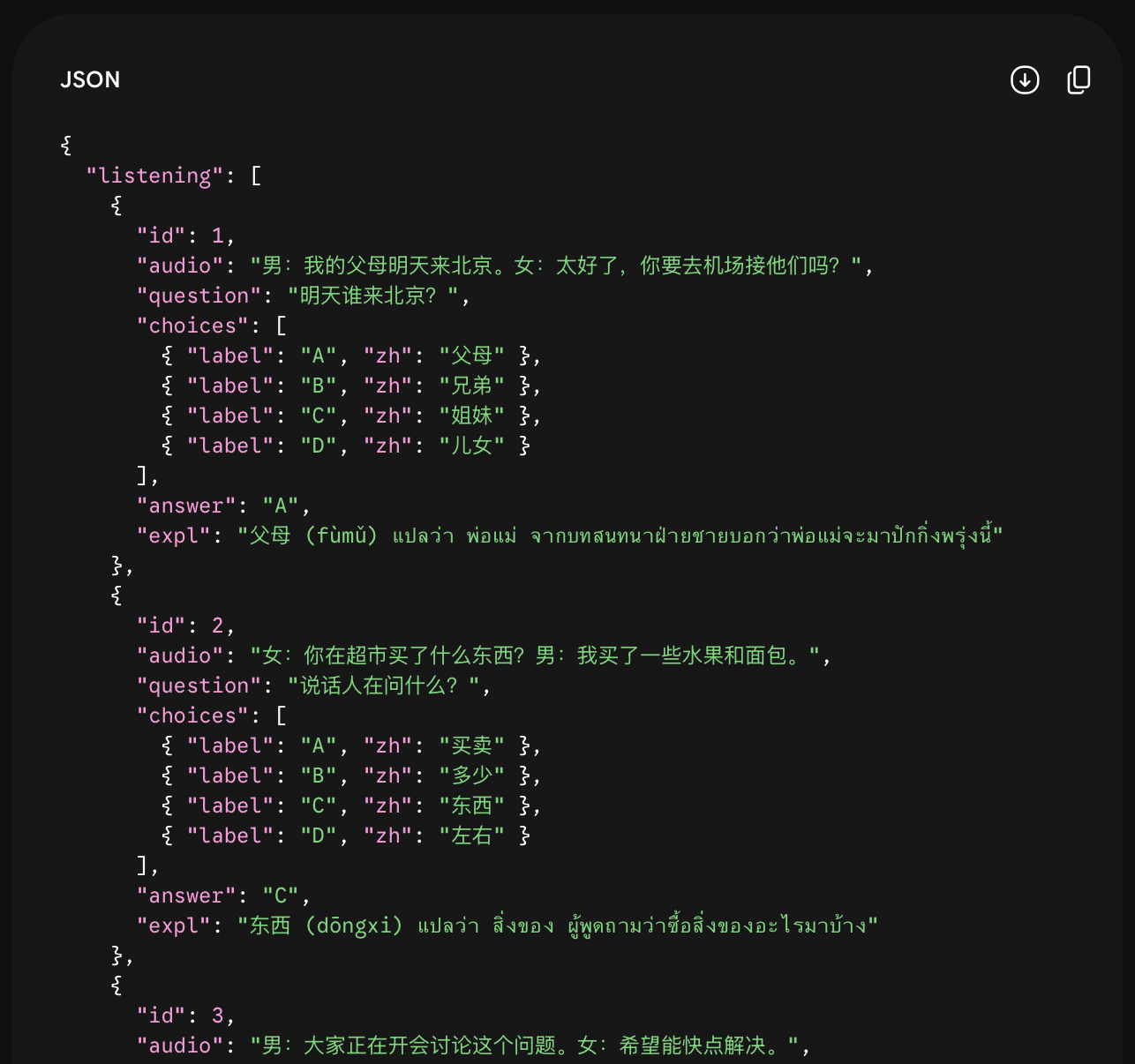
ผลลัพธ์ที่ได้จาก AI จะเป็นกล่องโค้ด JSON ที่มีข้อมูลครบทั้ง 3 หมวด (ฟัง, อ่าน, เขียน)
ให้กดคัดลอกเตรียมไว้เลย
Step 2: การสร้างโครงสร้างเว็บ (HTML Structure)
Prompt 2 (พิมพ์ต่อในแชทเดิม)
เป้าหมาย: นำข้อมูลจากสเตปที่ 1 มากางออก แล้วสร้างเป็นหน้าตาเว็บไซต์
ระบุว่าต้องมี 'หน้าหลัก' และ 'หน้าทำแบบทดสอบ' ที่แบ่งเป็นทักษะการฟัง, การอ่าน, และการเขียน พร้อมทั้งสร้างปุ่ม 'ถัดไป' 'ย้อนกลับ' กำหนดให้มี 4 ตัวเลือก (ก, ข, ค, ง) และทักษะการเขียนให้มี 'กล่องข้อความ'
⭐ จุดสังเกต: หากลองเปิดเว็บดู จะเห็นปุ่มฟังเสียงโผล่ขึ้นมาแล้ว แต่ถ้ากดแล้วยังไม่มีเสียง... ไม่ต้องตกใจนะครับ เพราะตอนนี้เราเพิ่งสร้างแค่หน้าตา ยังไม่ได้เชื่อมต่อระบบเสียงครับ
ระบุว่าต้องมี 'หน้าหลัก' และ 'หน้าทำแบบทดสอบ' ที่แบ่งเป็นทักษะการฟัง, การอ่าน, และการเขียน พร้อมทั้งสร้างปุ่ม 'ถัดไป' 'ย้อนกลับ' กำหนดให้มี 4 ตัวเลือก (ก, ข, ค, ง) และทักษะการเขียนให้มี 'กล่องข้อความ'
⭐ จุดสังเกต: หากลองเปิดเว็บดู จะเห็นปุ่มฟังเสียงโผล่ขึ้นมาแล้ว แต่ถ้ากดแล้วยังไม่มีเสียง... ไม่ต้องตกใจนะครับ เพราะตอนนี้เราเพิ่งสร้างแค่หน้าตา ยังไม่ได้เชื่อมต่อระบบเสียงครับ
Please build an HSK mock exam Web App for me. Write everything in a single HTML file.
Do not separate the files; I will open it directly in my browser.

## Exam Data (DATA)
Please look back at the JSON exam data you generated in your previous message in this conversation, and embed that data into a JavaScript variable named `EXAM_DATA`. Do NOT ask me to paste it again.

## Web Design (Use Tailwind CSS via CDN)
- **Important Font Setup:** Import the Google Font "K2D" as the main font to display Thai beautifully on Mac and Windows.
- Use a light cream background (#fdf8f5) and dark gray for main text.
- Primary buttons should be orange (#d35400) with modern rounded-2xl cards and shadows.

## Version 1 Features: Structure and Tabs
1. **Start Screen (หน้าจอเริ่มสอบ):** Display the app name, an input field for "กรอกชื่อผู้สอบ" (enter name), and a start button.
2. **Exam Screen (หน้าทำข้อสอบ):**
   - Have 3 tabs at the top: "🎧 การฟัง" (Listening), "📖 การอ่าน" (Reading), "✍️ การเขียน" (Writing).
   - Clicking "ถัดไป" (Next) repeatedly should automatically switch from Listening to Reading to Writing sections.
   - Listening/Reading sections: Display the question and 4 clickable choice buttons.
   - Writing section: Display the question with a text input field for the answer.

Rule: Do NOT use <script type="module"> and do NOT fetch external data. Output the code as a single block.
✅ ลองนำโค้ดที่ได้ไปเซฟเป็นไฟล์
exam.html แล้วเปิดดู เราจะได้เว็บที่มีแท็บ 3
หมวดแล้ว! (แต่พาร์ทฟังยังไม่มีเสียงนะ)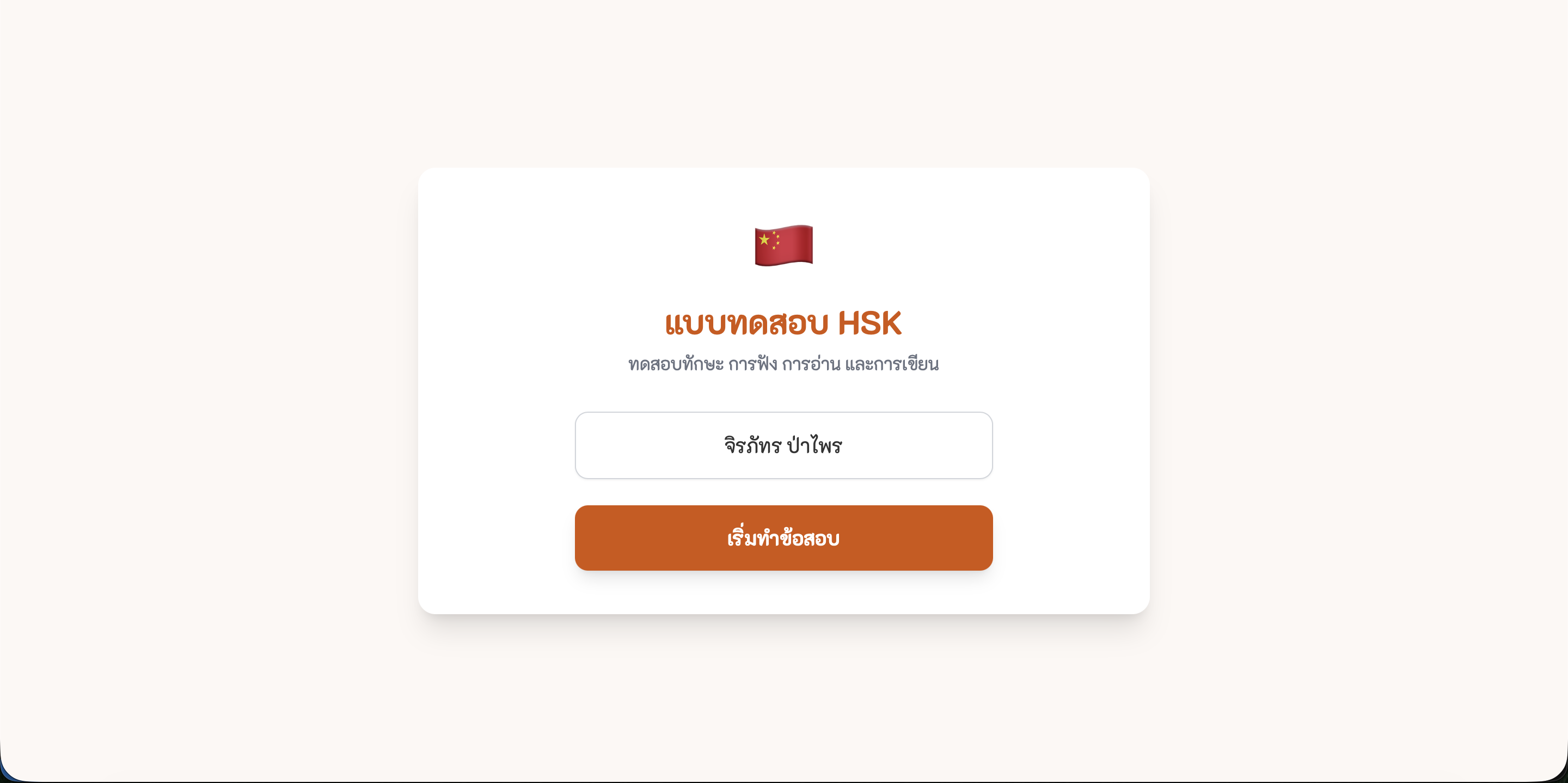
1. หน้าแรกสำหรับกรอกชื่อผู้สอบ
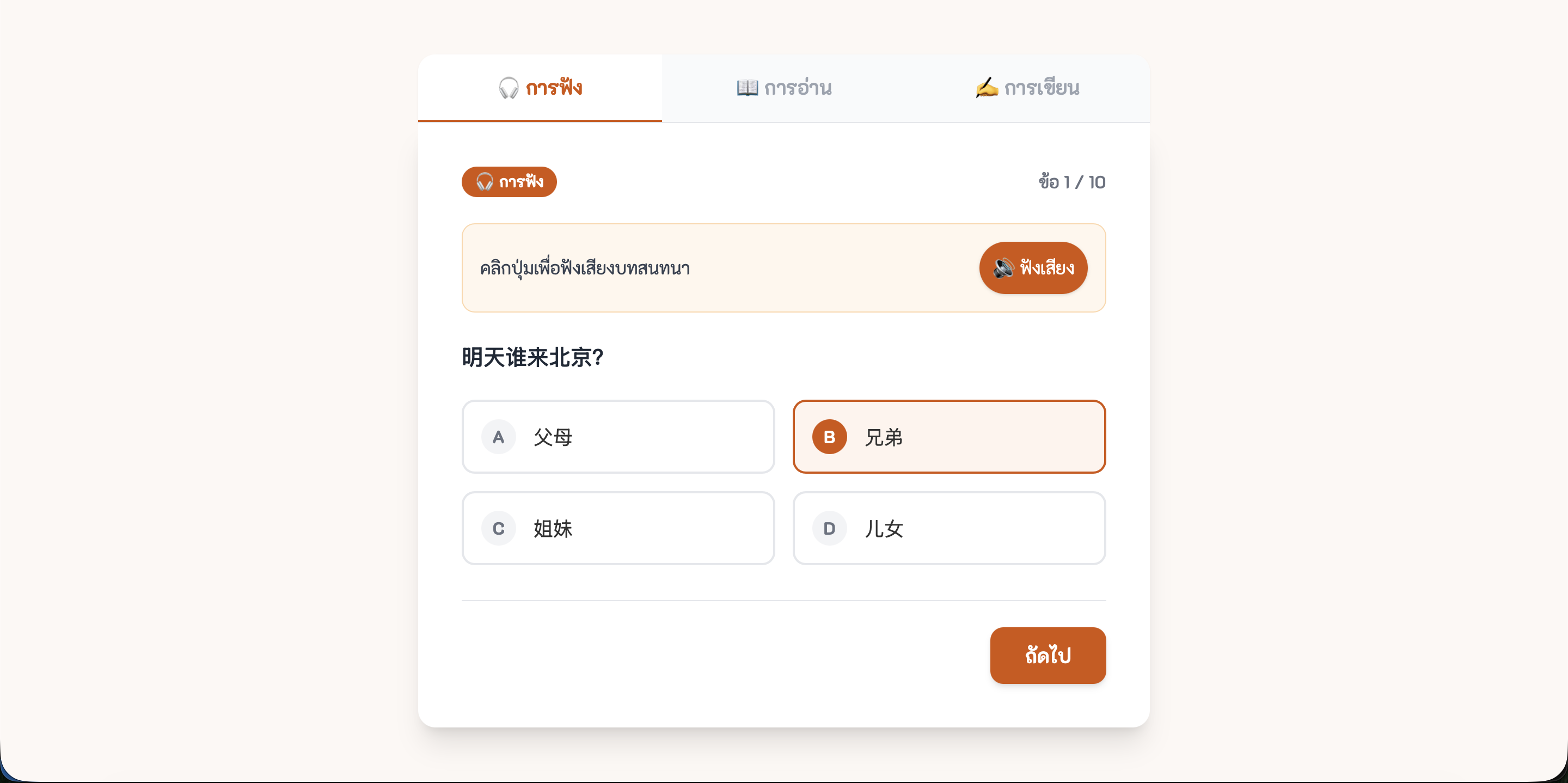
2. แท็บการฟัง (Listening) พร้อมตัวเลือก 4 ข้อ
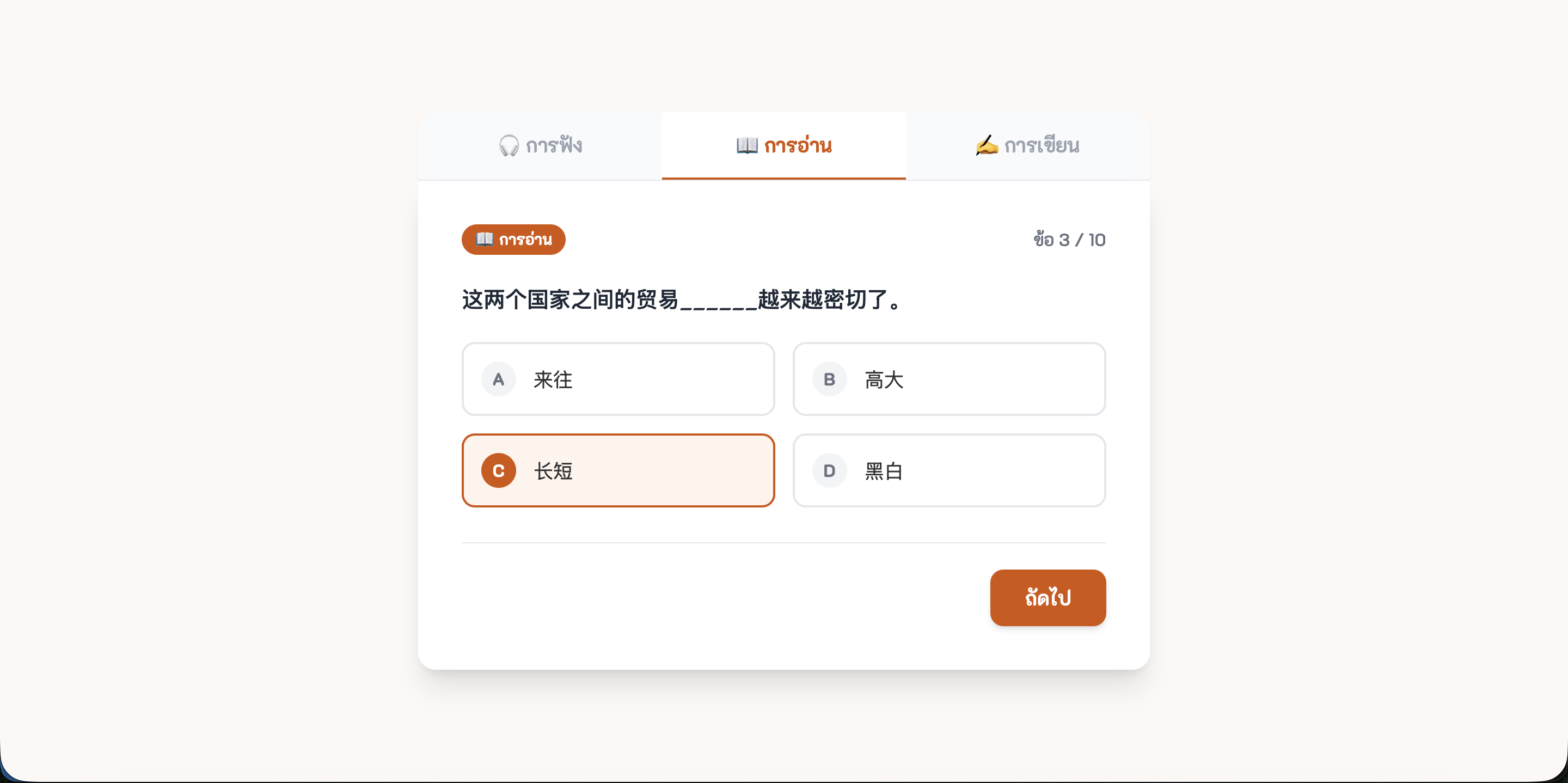
3. แท็บการอ่าน (Reading)
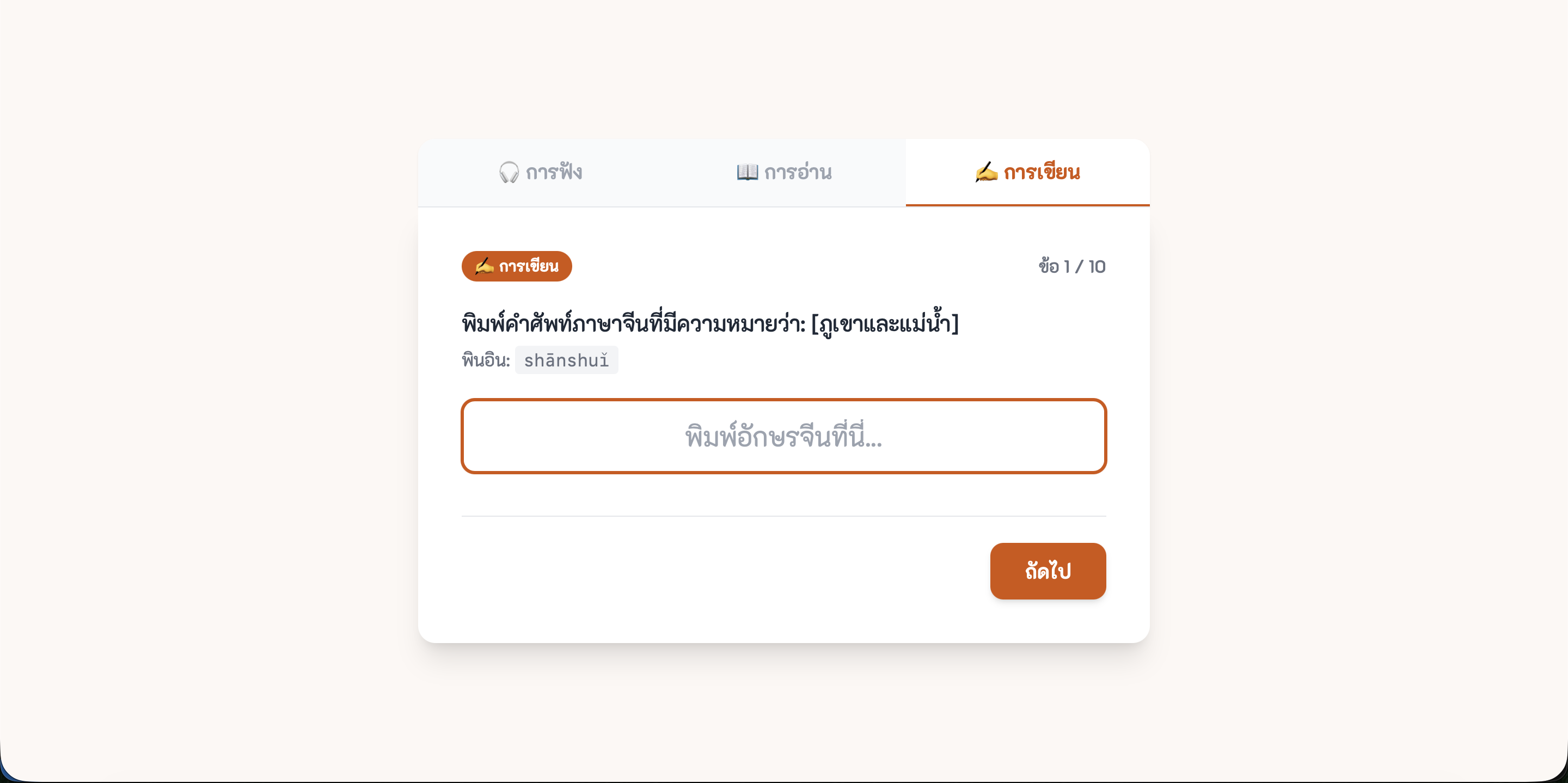
4. แท็บการเขียน (Writing) พร้อมช่องให้พิมพ์ตอบ
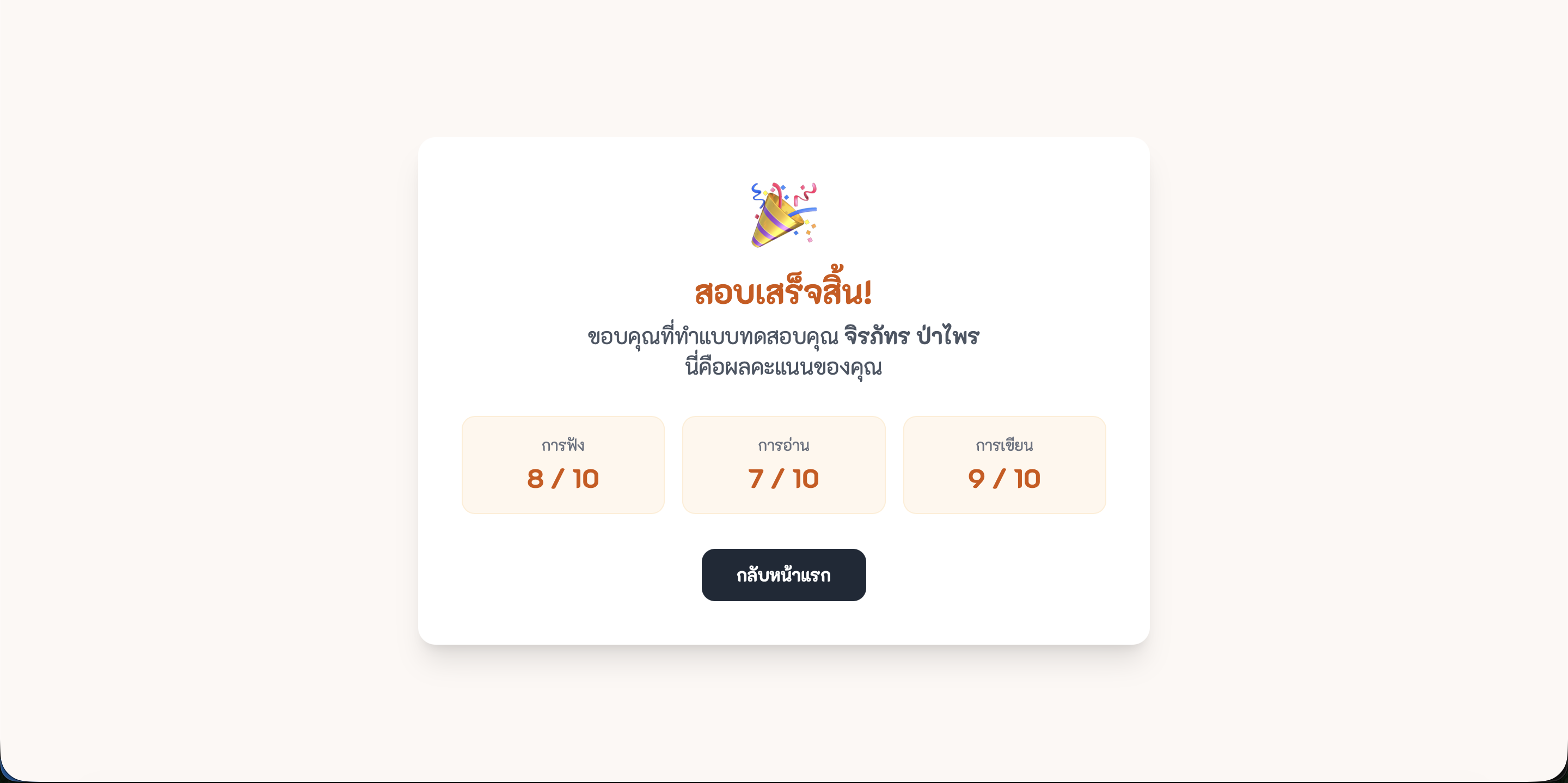
5. โครงสร้างผลสอบเบื้องต้น
Step 3: ระบบเสียงและแผงควบคุม (Audio & Navigation)
Prompt 3 (พิมพ์คุยต่อในแชทเดิม)
เป้าหมาย: ทำให้ระบบเสียงทำงาน และสร้างแผงควบคุมข้อสอบ
เราจะนำระบบ Web Speech API เข้ามาฝังในปุ่ม เพื่อให้อ่านออกเสียงข้อสอบในทักษะการฟังได้อย่างสมบูรณ์แบบ นอกจากนี้ จะสร้าง "แผงควบคุมข้อสอบ (Control Panel)" เพื่อให้นักเรียนเช็คได้ว่าทำข้อไหนไปแล้ว หรือกลับมาทำข้อที่ข้ามไปได้ทันที
เราจะนำระบบ Web Speech API เข้ามาฝังในปุ่ม เพื่อให้อ่านออกเสียงข้อสอบในทักษะการฟังได้อย่างสมบูรณ์แบบ นอกจากนี้ จะสร้าง "แผงควบคุมข้อสอบ (Control Panel)" เพื่อให้นักเรียนเช็คได้ว่าทำข้อไหนไปแล้ว หรือกลับมาทำข้อที่ข้ามไปได้ทันที
Excellent! Now I want to add more interactive functions to the existing code.
Please upgrade the code and output the full updated HTML file.

Features to add:
1. **Text-to-Speech:** In the "การฟัง" (Listening) section, add a "▶ ฟังเสียง" (Play Audio) button above the question. When clicked, use `window.speechSynthesis` to read out the Chinese text from the `audio` field in the JSON. Set the voice language to Chinese ('zh-CN').
2. **Question Palette (แผงข้อสอบ):** Create a small button at the bottom of the screen that opens a pop-up grid of all question numbers.
   - Questions that have been answered should turn solid orange.
   - Unanswered questions should have a gray border.
   - Clicking a question number should immediately jump to that question.

Same rule: Combine everything in a single HTML file. Do NOT cut or split the code block.
✅ นำโค้ดไปเซฟทับไฟล์เดิม ลองเปิดแล้วเข้าหมวดการฟัง กดปุ่มเพื่อฟังเสียง AI พูดภาษาจีนได้เลย!
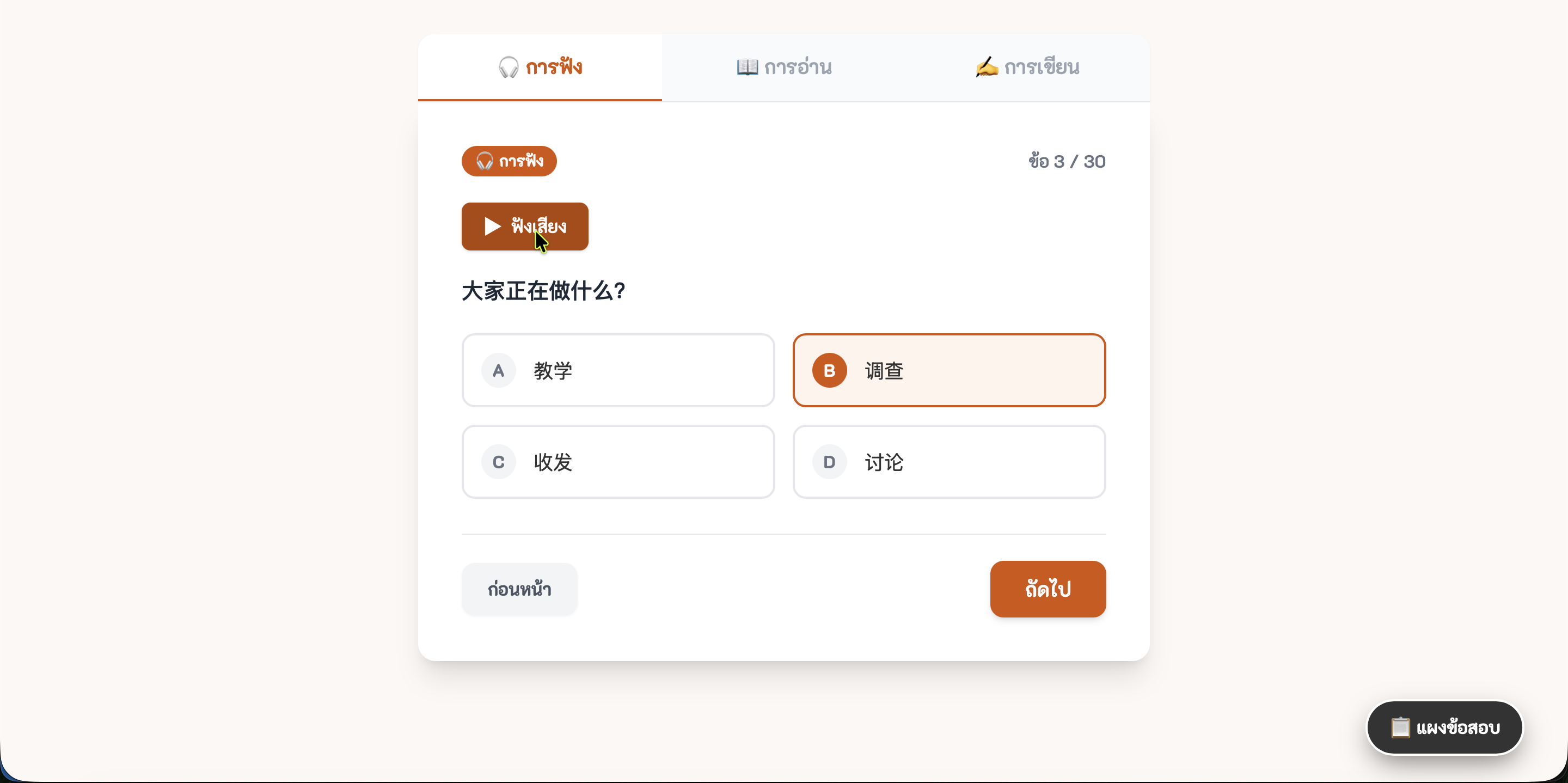
เพิ่มปุ่ม "▶ ฟังเสียง" ในหมวดการฟัง เมื่อกดจะมีเสียงอ่านภาษาจีนออกมา
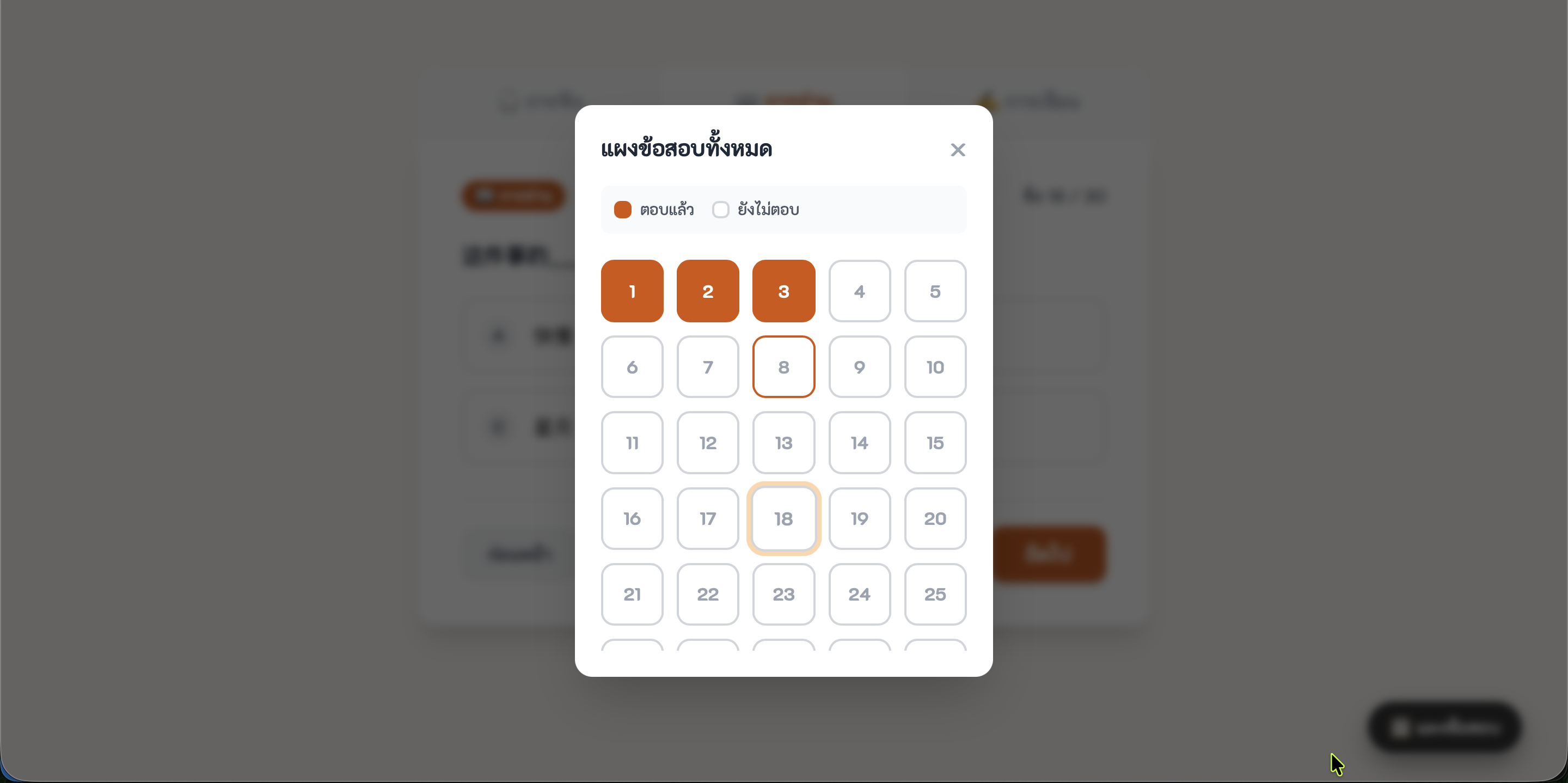
เพิ่มแผงข้อสอบ (Palette) ช่วยให้ดูง่ายว่าข้อไหนทำแล้วหรือยังไม่ทำ
Step 4: การตรวจข้อสอบและวิเคราะห์ผล (Evaluation & Timing)
Prompt 4 (พิมพ์คุยต่อในแชทเดิม)
เป้าหมาย: สร้างระบบประเมินผลอัจฉริยะและจับเวลาเพื่อลดภาระคุณครู
เราจะสั่งให้ AI สร้างระบบตรวจข้อสอบอัตโนมัติเมื่อกดส่ง โดยวิเคราะห์ผลสอบแบบเจาะลึกรายข้อและรายทักษะ ให้ข้อเสนอแนะจุดเด่นและจุดที่ต้องพัฒนา พร้อมทั้งจำลองสนามสอบจริงด้วยการตั้งเวลาและจับเวลาถอยหลัง
🔥 ภารกิจ: เปลี่ยนตัวเลขเวลาใน Prompt ก่อนกดส่ง!
เราจะสั่งให้ AI สร้างระบบตรวจข้อสอบอัตโนมัติเมื่อกดส่ง โดยวิเคราะห์ผลสอบแบบเจาะลึกรายข้อและรายทักษะ ให้ข้อเสนอแนะจุดเด่นและจุดที่ต้องพัฒนา พร้อมทั้งจำลองสนามสอบจริงด้วยการตั้งเวลาและจับเวลาถอยหลัง
🔥 ภารกิจ: เปลี่ยนตัวเลขเวลาใน Prompt ก่อนกดส่ง!
Great! For the final step, let's implement the grading system.
Please upgrade the code and output the final, complete HTML version.

Features to add:
1. **Countdown Timer (แถบจับเวลา):** At the top corner, display a total countdown timer of [👉 ใส่เวลาสอบ เช่น 15 👈] minutes. It must keep running regardless of which tab is active. When the time is up, force submit the exam immediately.
2. **Result Screen (หน้าจอผลสอบ):** When clicking the "ส่งข้อสอบ" (Submit) button (on the last question of the writing section), transition to the summary screen.
3. **Result Details:**
   - Display the total score prominently (e.g., 10/15).
   - Display 3 separate boxes showing the score for Listening, Reading, and Writing.
   - **Strengths (จุดเด่น):** Based on the results, highlight which skill(s) the student performed best in, with a brief encouraging message.
   - **Areas to Improve (จุดควรพัฒนา):** Identify which skill(s) the student scored lowest in, and suggest what to focus on practicing.
   - **Answer Review (เฉลยรายข้อ):** Show a detailed answer key for every question. For each item, show the question, whether the answer was correct or wrong, the correct answer, and the explanation from the `expl` field in the JSON.
   - Include a "กลับสู่หน้าแรก" (Return to Home) button to retake the exam.

Output everything in a single HTML file without cutting off the code.
✅ สมบูรณ์แบบ! นำไปรันและทดสอบระบบทั้งหมดได้เลย
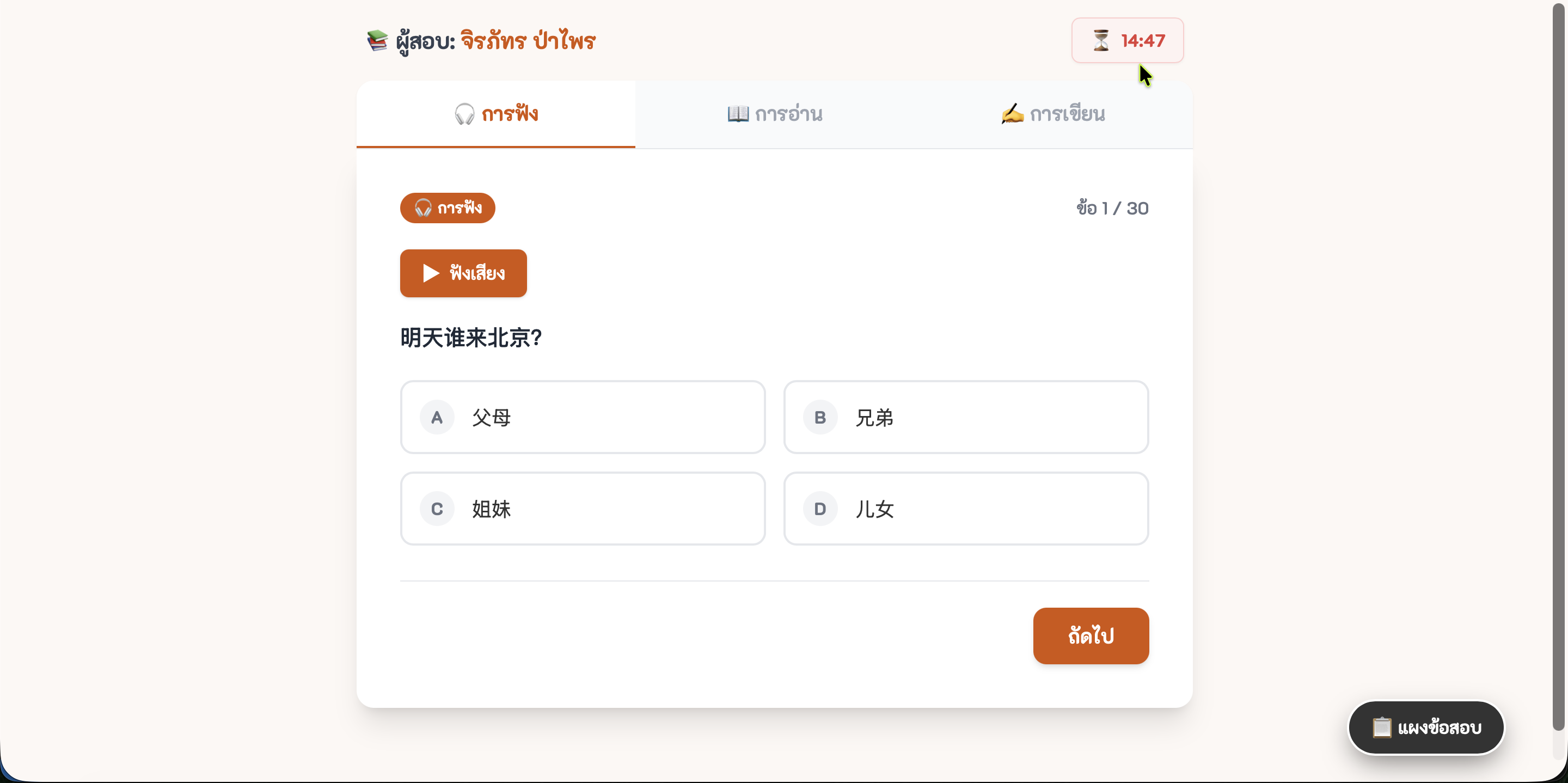
1. แถบจับเวลาถอยหลัง (Timer) ด้านบนจอ เมื่อหมดเวลาจะบังคับส่งข้อสอบอัตโนมัติ
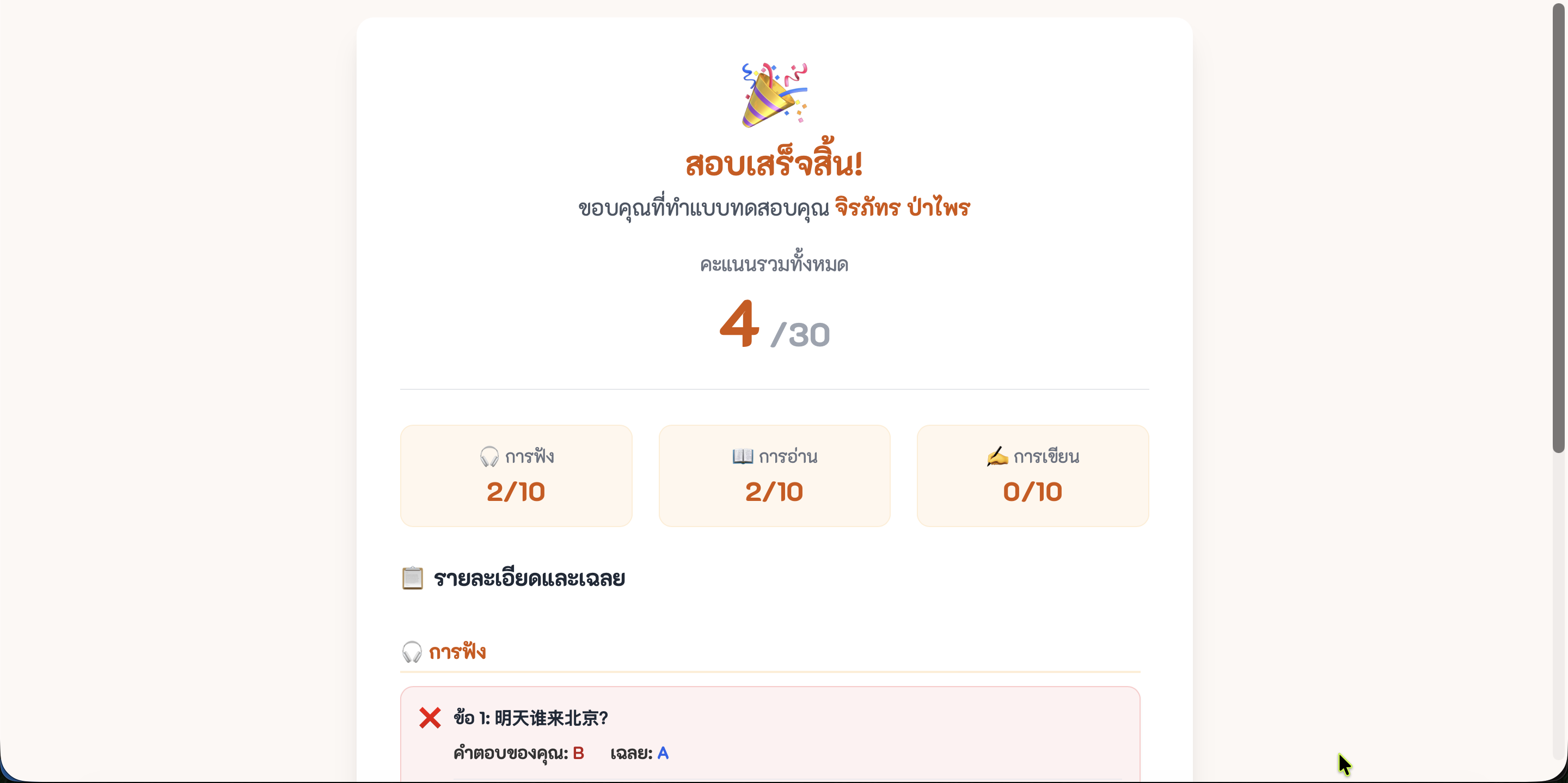
2. หน้าจอสรุปผลสอบ (Result) แยกคะแนนตามหมวดทักษะชัดเจน
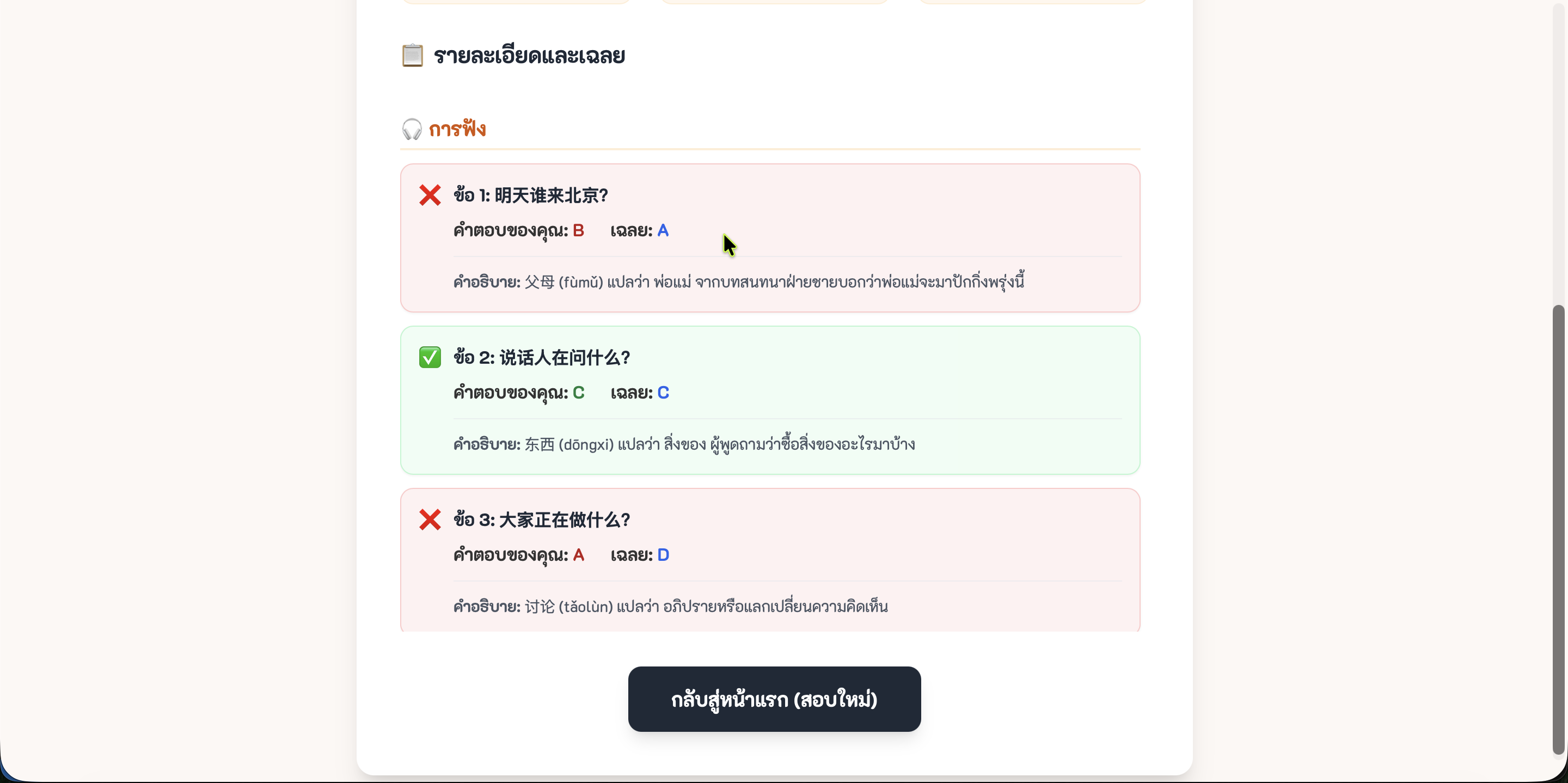
3. ระบบตรวจคำตอบ แสดงเฉลย และคำอธิบายจาก AI สำหรับข้อที่ทำผิด
กล่องเครื่องมือฉุกเฉิน (บรรทัดกู้ชีพ)
หากเปิดเว็บแล้วจอดับ หรือ AI พิมพ์โค้ดไม่จบ ให้ก๊อปปี้ข้อความนี้ไปสั่งให้ AI ซ่อมครับ:
| ปัญหาที่เจอ | ประโยคสำหรับสั่ง AI ให้ช่วยซ่อมโค้ด |
|---|---|
| เปิดมาแล้วหน้าจอขาวโพลน |
โค้ดที่ให้มาพอเปิดในเบราว์เซอร์แล้วหน้าจอขาวโพลน ไม่มีอะไรขึ้นเลย น่าจะมีบั๊กหรือพิมพ์ผิดไวยากรณ์ ช่วยตรวจสอบการอ้างอิงฟังก์ชันตัวแปร และส่งโค้ดที่ซ่อมแล้วมาให้ใหม่ทั้งหมด
|
| AI พิมพ์โค้ดมาให้ครึ่งเดียว แล้วหยุด |
โค้ดถูกตัดกลางคัน พิมพ์โค้ดมาไม่ครบ โปรดเขียนโค้ดที่เหลือต่อจากบรรทัดสุดท้ายให้จบสมบูรณ์ในกล่องโค้ดเดียว (ห้ามแยกไฟล์เด็ดขาด)
|
| คลิกปุ่มหรือระบบเสียงไม่ทำงาน |
ปุ่มบนเว็บหรือระบบเสียงกดแล้วไม่ทำงาน ช่วยตรวจสอบระบบคำสั่ง (JavaScript) และแก้ไขโค้ดให้กลับมาทำงานได้ปกติ
|
แบบรวบรัด: Prompt รวม (สำหรับขั้นแอดวานซ์)
หากต้องการทำรวดเดียวจบ สามารถคัดลอก Prompt นี้ไปวางได้เลย (AI จะสร้างทั้งข้อมูลและหน้าเว็บที่สมบูรณ์ให้ทันที)
Prompt รวม (แนบไฟล์คำศัพท์ไปด้วย)
ข้อควรระวัง: การสั่งแบบรวมในครั้งเดียว อาจจะทำให้ AI พิมพ์โค้ดสะดุด หรือให้คำตอบยาวเกินไปจนตัดจบ ถ้าเจอปัญหาโค้ดไม่ครบ ให้พิมพ์บอก AI ว่า "พิมพ์โค้ดต่อให้จบในกล่องเดียว"
* จำนวนข้อสอบจะอ้างอิงจากตัวเลขที่ตั้งไว้ใน Step 1
* จำนวนข้อสอบจะอ้างอิงจากตัวเลขที่ตั้งไว้ใน Step 1
I have attached a Chinese vocabulary file.
Act as a professional Chinese language teacher and create an HSK mock exam.
First, generate the exam data. Divide the exam into 3 sections:
- listening: __LISTENING__ questions
- reading: __READING__ questions
- writing: __WRITING__ questions

Section details:
1. listening - Multiple choice (4 options) with an audio sentence and a question.
2. reading - Multiple choice (4 options) fill-in-the-blank questions.
3. writing - Subjective. Provide the Thai translation and require the user to type the correct Chinese characters.

Please format the data strictly as a "JSON" object.
{
  "listening": [
    { "id": 1, "audio": "ประโยคสนทนาภาษาจีน...", "question": "คำถาม...", "choices": [ {"label": "A", "zh": "ตัวเลือก A"} ], "answer": "A", "expl": "เฉลยสั้นๆ" }
  ],
  "reading": [
    { "id": 11, "question": "คำถามเว้นช่องว่าง...", "choices": [ {"label": "A", "zh": "ตัวเลือก A"} ], "answer": "A", "expl": "เฉลยสั้นๆ" }
  ],
  "writing": [
    { "id": 21, "question": "พิมพ์คำศัพท์ภาษาจีนที่มีความหมายว่า: [คำแปล]", "py": "พินอินของคำตอบ", "answer": "อักษรจีนที่ถูกต้อง", "expl": "เฉลย" }
  ]
}

After creating the JSON data, embed it into a JavaScript variable named `EXAM_DATA` and build an HSK mock exam Web App for me. Write everything in a single HTML file. Do not separate the files.

## Web Design (Use Tailwind CSS via CDN)
- **Important Font Setup:** Import the Google Font "K2D" as the main font.
- Use a light cream background (#fdf8f5) and dark gray for main text.
- Primary buttons should be orange (#d35400) with modern rounded-2xl cards and shadows.

## Features to Implement:
1. **Start Screen:** Display app name, input for "กรอกชื่อผู้สอบ", and a start button.
2. **Exam Screen:** 3 tabs ("🎧 การฟัง", "📖 การอ่าน", "✍️ การเขียน"). "ถัดไป" (Next) switches between them.
3. **Text-to-Speech:** In Listening, add a "▶ ฟังเสียง" button. Use `window.speechSynthesis` (zh-CN) to read the `audio` field.
4. **Question Palette:** A pop-up grid of all question numbers. Answered = solid orange, unanswered = gray border. Clicking jumps to the question.
5. **Countdown Timer:** Display a total timer of 15 minutes. Auto-submit when time is up.
6. **Result Screen:** Show total score, separate scores for each skill, Strengths, Areas to Improve, and detailed Answer Review (showing explanation from `expl`). Include a "กลับสู่หน้าแรก" button.

Rule: Output ONLY the final HTML code as a single block. Do not use <script type="module"> and do not fetch external data.